

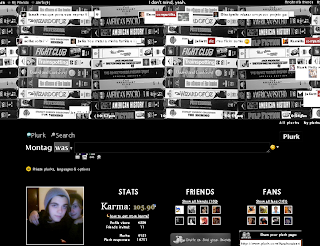
Plurk’s defaut CSS layout:
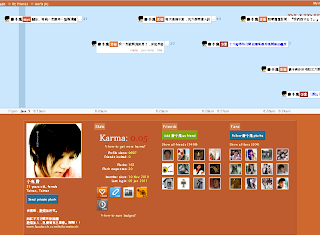
Plurk’s custom CSS layout:


Tired of your existing Social Networks? Share your life easily with friends, family and fans...
1 - Visit www.plurk.com your web browser.
2 - On the same screen click “Sing up For Free” to you register.

3 - On the screen you are taken to enter your name and other information frequently, and finally click on “Sing up at Plurk!”.
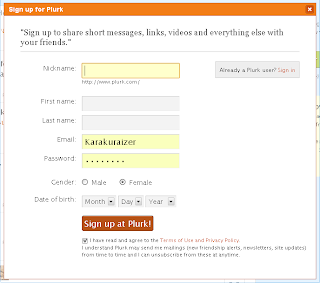
Congratulations! Now you have a Plurk account.

Plurk is a free social networking and micro-blogging service that allows users to send updates (otherwise known as plurks) through short messages or links, which can be up to 140 text characters in length.
Updates are then shown on the user's home page using a timeline which lists all the updates received in chronological order, and delivered to other users who have signed up to receive them. Users can respond to other users' updates from their timeline through the Plurk.com website, by instant messaging, or by text messaging.
Plurk was developed by and envisioned as a communication medium meant to form a balance between blogs and social networks, and between e-mail messaging and instant messaging. After months of development, Plurk was launched on May 2008.
The etymology of the name was explained by the developers as such:
Plurk's interface shows updates in horizontal form through a scrollable timeline written in JavaScript and updated through AJAX. Users can post new messages with optional 'qualifiers', which are one-word verbs used to represent a thought (e.g. "feels", "thinks", "loves", etc.). There are also advanced features such as sending updates only to a subset of your friends, posting updates on events earlier in the day, and sharing images, videos, and other media. Plurks can also be "liked", as in other social sites.
Plurk also supports group conversations between friends and allows usage of emoticons together with the usual text micro-blogging.
The Plurk.com developers released public access to API on December 4, 2009
Due to messages being sent between users in near-realtime, many users use Plurk as an alternative to chat.
1 - Visit www.facebook.com your web browser.
2 - On the same screen as you register.
3 - On the screen you are taken to enter your name and other information frequently, and finally click on 'Register'.
4 - Now you must enter your e-mail client and choose a password ..
Congratulations! Now you have a Facebook account.
Facebook is a social network launched on February 4, 2004. It was founded by MarkZuckerberg, Dustin Moskovitz, Eduardo Saverin and Chris Hughes, a former studentof Harvard University. Initially, membership of Facebook was restricted to students of Harvard University. It was expanded to the Massachusetts Institute of Technology(MIT), Boston University, Boston College and to all Ivy League schools within twomonths. Many individual universities were added in following years. Eventually, people with e-mail for universities (for example,. Edu,. Ac.uk) around the world wereelected to join the network. On 27 February 2006, Facebook began to also accepthigh school and some businesses. Since September 11, 2006, only users with 13 years of age or older can join. Users can join in one or more networks, such as aschool, a workplace or a geographical region.
The website has more than 500 million active users, Facebook's position in the ranking of visitor traffic from Alexa, rose from 60th place to 7th place. It is still the largest site of photographs of the United States, with more than 60 million new photoseach week, surpassing even turned to photography sites like Flickr.
In 1000 Sites Top Ad Planner, which records the most accessed sites in the world,through the Google search engine, released in February 2011, Facebook appears as1st place with 590 million visitors and a global reach of 38.1 %.


